Don't you need this gizmo.... :think:
http://www.shopping.com/xPO-Matrox-Matr ... or-Windows
Tony
FS Multi screen
Moderators: Guru's, The Ministry
-
Techy111

- Battle of Britain

- Posts: 3319
- Joined: 15 Aug 2007, 13:51
- Location: Coming out of Retirement.
Re: FS Multi screen
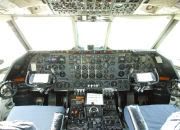
The last surviving and complete Vickers Vanguard....."Superb"


-
DaveB

- The Ministry
- Posts: 30457
- Joined: 17 Jun 2004, 20:46
- Location: Pelsall, West Mids, UK
- Contact:
Re: FS Multi screen
They're expensive but effective. If you want to go any more than 2 monitors, you would either have to use one of those triple heads or go WideFS. The downside of WideFS is that you need another pc but it does work.. I know having tried it. However.. it's fiddly :think:
ATB
DaveB :tab:
ATB
DaveB :tab:


Old sailors never die.. they just smell that way!


Re: FS Multi screen
You can put a second graphics card in if your MB will allow it and that way you can run 4 monitorsDaveB wrote:They're expensive but effective. If you want to go any more than 2 monitors, you would either have to use one of those triple heads or go WideFS. The downside of WideFS is that you need another pc but it does work.. I know having tried it. However.. it's fiddly :think:
ATB
DaveB :tab:
Jim
Re: FS Multi screen
Providing you've got 2 graphics cards or a Matrox TH2Go! then there are several ways of achieving your Left/Forward and Right/Forward views: either using 2D views and setting them up in the Panel.cfg file or by opening 2 additional VC views and panning/tilting each one until you get the desired view.Chris558 wrote:Hi Guys,
What I would like is a central screen for the cockpit/straight ahead view and one on each side for diagonal side view (or 90 degree side view) So is it simply a case of plugging in two more monitors, and altering the settings in FS?
Regards
Jim
-
DaveB
- The Ministry
- Posts: 30457
- Joined: 17 Jun 2004, 20:46
- Location: Pelsall, West Mids, UK
- Contact:
Re: FS Multi screen
Hi Jim..
Yup.. a second card is another option. I had no success when I tried it but that's been a while and things have moved on.. and then some ;-)
ATB
DaveB :tab:
Yup.. a second card is another option. I had no success when I tried it but that's been a while and things have moved on.. and then some ;-)
ATB
DaveB :tab:
Old sailors never die.. they just smell that way!
-
Keith Jones
- Victor

- Posts: 220
- Joined: 20 May 2005, 19:01
- Location: St Leonards on Sea, Sussex, UK
Re: FS Multi screen
On my FS setup (when I can be bothered to actually fly something  ) I use six monitors. They are arranged in two rows of three; the top three being for the outside views, the lower left for popup panels, the lower centre for the main panel and the lower right for FSNav. I have two graphics cards installed (nvidia GF8800GTX and a Radeon 9200 Pro). To the Nvidia card I have the Matrox TH2GO box attached, one of the most worthwhile investments I have made. FS9 works very well, but so does FSX. Although I don't use FSX at the moment (mainly because there is still no substitute for FSNavigator. FSCommander is OK, but it's just not the same as FSNav), I will keep it for when the inevitable day arrives when nothing but FSX will do. Hope this helps in some way.
) I use six monitors. They are arranged in two rows of three; the top three being for the outside views, the lower left for popup panels, the lower centre for the main panel and the lower right for FSNav. I have two graphics cards installed (nvidia GF8800GTX and a Radeon 9200 Pro). To the Nvidia card I have the Matrox TH2GO box attached, one of the most worthwhile investments I have made. FS9 works very well, but so does FSX. Although I don't use FSX at the moment (mainly because there is still no substitute for FSNavigator. FSCommander is OK, but it's just not the same as FSNav), I will keep it for when the inevitable day arrives when nothing but FSX will do. Hope this helps in some way.Wherever you go, there you are.
-
tonymadge
- Vintage Pair

- Posts: 2082
- Joined: 28 Jun 2004, 14:49
- Location: middle earth next to the public toilet
- Contact:
Re: FS Multi screen
Missed a lot of this thread due to modem going kaput on me, gee did not realise how important net is when I havea stack of stuff to sort out on line!
Rick, your right I did not give FSX much of a chance, I do have the patches and it runs acceptable on my old tired rig, but I cant work without FSnav and a few other things I think FS9 has the hold over FSX, lets be honest though FS9 is easier to set up and run than FSX which like Vista seems to suck resouces without great gains. Ok I have seen your wonderful Hawk and the video and yes the VFR scenery was brilliant compared to the crappy FS9 stuff, however for a reason I wont go into (bar to state I was treated unfairly by publisher) I got rid of that scenery .... Hence I would not use anything from that publisher again.
I just find FS9 has much more to offer for me anyway, but I will no longer "bash" FSX...as hard as that will be I like most are no doubt bored of the argument, we have our choices and will have to stick with what we like.
I know you wont develop for FS9 again and that I understand. I will be updating my PC soon...ish depends on money. I will then try FSX properly but I really will miss FSnav :-(
Rick, your right I did not give FSX much of a chance, I do have the patches and it runs acceptable on my old tired rig, but I cant work without FSnav and a few other things I think FS9 has the hold over FSX, lets be honest though FS9 is easier to set up and run than FSX which like Vista seems to suck resouces without great gains. Ok I have seen your wonderful Hawk and the video and yes the VFR scenery was brilliant compared to the crappy FS9 stuff, however for a reason I wont go into (bar to state I was treated unfairly by publisher) I got rid of that scenery .... Hence I would not use anything from that publisher again.
I just find FS9 has much more to offer for me anyway, but I will no longer "bash" FSX...as hard as that will be
I like most are no doubt bored of the argument, we have our choices and will have to stick with what we like.I know you wont develop for FS9 again and that I understand. I will be updating my PC soon...ish depends on money. I will then try FSX properly but I really will miss FSnav :-(
AMD Phenom II X4 BE 965 @ 3.80GHz
nVidia GTX 560 TI 448 Cores
-
Rick Piper

- The Gurus
- Posts: 4776
- Joined: 18 Jun 2004, 17:20
- Location: In front of screen learning 3ds max :/ ...............Done it :)
Re: FS Multi screen
Hi Tony
Yes FSNav was hard for me to part with but i rarely fly anywhere to aplan these days as it's just model & FDE testing for 99% of my flying.
Regards
Rick
Yes FSNav was hard for me to part with but i rarely fly anywhere to aplan these days as it's just model & FDE testing for 99% of my flying.
Regards
Rick