
Fingerpainting by numbers

Links to Classic British Flightsim themed images only please.
Please post in jpg or png format and no bigger than 1024 x 768

Moderators: Guru's, The Ministry

User avatar
AllanL
Concorde
Concorde
Posts: 828
Joined: 06 Sep 2005, 21:01
Location: Scotland

Fingerpainting by numbers

Post by AllanL »

I thought I should stop hijacking John's topic and start the ramblings of a paint by pixels newbie.

Now that John has shown me it can be done, I'll start my own attempt at a swoopy scheme from the colonies on the two Daks, and as a cunning cover plan to keep within the CB frame of reference, I was thinking of having a go at G-AMPO in its Eastern Airways guise.

:$ Edit : Belay that idea - John's done it already! Maybe I'll stick to the Rapides for now as a little project. :lol:

It would take John about 30 seconds to convert the green-stripe G-AMPO to Air Luton of course. There's the half-way back from Northwest Air Atlantique scheme as well. Eastern has most straight lines though!

I've just recently got the de Havilland Dragon/Rapide/DH86 tome from the Mosquito Museum shop, so may attempt some of the British Rapides before they get snaffled by someone else. :)

A British Airways (the original Hillman Airways blue style) DH-86 might look nice too. Simple solid colours for a chicken to start with!

I may be gone some time. :lol:
Last edited by AllanL on 03 Oct 2007, 14:09, edited 1 time in total.

User avatar
Techy111
Battle of Britain
Battle of Britain
Posts: 3319
Joined: 15 Aug 2007, 13:51
Location: Coming out of Retirement.

Re: Fingerpainting by numbers

Post by Techy111 »

Hi mate....I was a noob until i came here....To see what can be accomplished in quite a short amount of time (yeah right ;-) ) check my DLT paint thread in the repaint section.

Techy
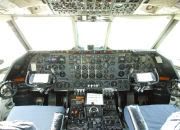
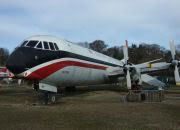
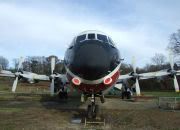
The last surviving and complete Vickers Vanguard....."Superb"
ImageImageImage

User avatar
AllanL
Concorde
Concorde
Posts: 828
Joined: 06 Sep 2005, 21:01
Location: Scotland

Re: Fingerpainting by numbers

Post by AllanL »

Right step 1 in the search for a British cover plane for the colonial job - find something to paint!

After much digging through sundry books and web searches, I have one very simple DC-3 scheme for G-AIWE that is in the back of the British Civil Vol II by AJ Jackson. But I can only find a b&w picture. The scheme is on a bare metal a/c with a Union Jack on the tail, the company name Crewsair Ltd. above three lines through the windows and the title CREWSENDEVOUR on the nose. (They owned the plane)

Quite the easiest scheme, but it raises a couple of basic questions.

First, do I make up my own union Jack for the tail or pester another painter for use of theirs subject to suitable acknowledgements?

Second, without any idea of what dark colour the paintwork is done in, do I just do it in black, or pick my own choice from Dark Blue/Red/Maroon/Black as these seem to be the main colours used in period?

Finally for now, it's about time I got something to show in this gallery post :worried: but the search for colour schemes has shown up how thorough John has been in covering the field! I found a second Strathair a/c in a b&w pic which I thought "I can do that and John hasn't - yet", only to find that he has done G-APPO as operated by Autair. All they did to the scheme was scrub the St Andrews Cross off the tail and change STRATH to AUT in the title. Rats!

I did find a couple of Skyways DC-3 schemes that I will get started over the next few days, unless someone has already done them and I've missed finding the downloads. I've had a bit more success in finding colour pictures of Rapides that haven't been painted, so may start that line up after the first couple of DC-3s.

User avatar
Garry Russell
The Ministry
Posts: 27180
Joined: 29 Jan 2005, 00:53
Location: On the other side of the wall

Re: Fingerpainting by numbers

Post by Garry Russell »

H Allan

Search something like UK flag on Google and you will get sites you can download flags from.

Don't guess colours.........that is why we sometimes spend months reasearching on and off for colours and information.

If you do get it wrong then folks will think that was the right colour and things can get very muddled.

I see countless BA landor/Red tail that use the same blue when the Red Tail use BOAC blue and Landor used Midnight.

Also Landor often gets represented as a white top when in fact it was very grey.

These are the sort of errors that come about by guessing.

Research it the key. There is a Viking paint still not done beacause I can't confirm the colour although I believe I know what it is......another painter wanted to do that one as well and has not done it for the same reason.

So unfortunately you can't always get to paint missing subject.

Skyways is already being done.......I know that because I was involved in research and resourcing for the guy who is doing it.

But none of this stops you trying out a text paint........just do one for youself to get the hang of it and move on from there.


ATB

Garry
Garry

Image

"In the world of virtual reality things are not always what they seem."

User avatar
AllanL
Concorde
Concorde
Posts: 828
Joined: 06 Sep 2005, 21:01
Location: Scotland

Re: Fingerpainting by numbers

Post by AllanL »

Fairy 'Nuff as they say in panto circles. I may play around on a non-distributory basis with a couple of these as a learning exercise as you say.

One scheme that I have a single image of is a Hunting Surveys DC-3 taken from the left rear. This seems to have a logo on the nose, but no other picture has surfaced yet as to what that may look like in any detail. On with the search. :)

User avatar
Garry Russell
The Ministry
Posts: 27180
Joined: 29 Jan 2005, 00:53
Location: On the other side of the wall

Re: Fingerpainting by numbers

Post by Garry Russell »

Hi Allan.

Details like the Hunting Surveys logo can be difficult as there can be more than one logo used by different divisions of the same company.

Often a specific post about a logo can get a resonse from someone who was familar with it at the time..in some case they may have worked for the outfit.

Other members have stuff in files like letter heads and bits and bobs they collect over the years. :)

Also just typing in the name of the company and logo into Google can produce results like perhaps directing you to a forum where this has been discussed already...the answers turn up in the most bizarre places.

A great side product of researchiong is you often come across interesting stuff you have either planned for one day or even did not know about.

I have a odds and ends dump folder and I put all such finds in there. I visit it now and then and see if there is something worth doing that takes my fancy and if there is enough to do it. :think:

Maybe it seems a little frustrating just getting going but once you do there will be no stopping it. :)

Regards

Garry
Garry

Image

"In the world of virtual reality things are not always what they seem."

User avatar
AllanL
Concorde
Concorde
Posts: 828
Joined: 06 Sep 2005, 21:01
Location: Scotland

Re: Fingerpainting by numbers

Post by AllanL »

Well I finally got an approximation of the Air Luton tail beastie pasted over from a photo with a couple of edgeseeker cuts. The logo sits a trifle high, but I blame the shape of the MS model :worried:

Image

Image

So now it's time to start painting the stripes and gallons of white dulux over the lower fuselage and wings, but I've a report to finish first - so that's another day. I did say this was going to be slooow. |-)

User avatar
RAF_Quantum
The Gurus
Posts: 2745
Joined: 04 Jul 2004, 23:36
Location: NE Lincolnshire UK
Contact:

Re: Fingerpainting by numbers

Post by RAF_Quantum »

Hi Allan,

You should be able to drag the selection to the correct size that you need. If the result doesn't look good then select the layer, select the image, copy, paste as new image, resize, copy, paste as layer back into your Air Luton.psp file and see how it looks. Sometimes resizing the layer in a separate image gives better results than dragging the edges of the selection in. Looking good.

Rgds

John
Image

User avatar
AllanL
Concorde
Concorde
Posts: 828
Joined: 06 Sep 2005, 21:01
Location: Scotland

Re: Fingerpainting by numbers

Post by AllanL »

Now sticking on the side stripes, how to cope with opacity and the fading effect on colours? So far trying 60% opacity seems to drop the three colour values by about 20-30. Luton not exactly being in the tropics, I don't suppose I can get away with saying it has been out in the sun too long. So at the moment I have upped the opacity to 75% as the paint does seem to have been chucked on quite enthusiastically.

Is this a case of suck it and see, or is there a more scientific approach?

User avatar
Garry Russell
The Ministry
Posts: 27180
Joined: 29 Jan 2005, 00:53
Location: On the other side of the wall

Re: Fingerpainting by numbers

Post by Garry Russell »

Hi Allan

Are you making the colour very much darker before you increase the opacity?...that will help a bit.

Even now try darkening the thinned layer and see the effect.

Garry
Garry

Image

"In the world of virtual reality things are not always what they seem."

Post Reply