Page 1 of 3
Warning....Loadsa photos...!
Posted: 29 Dec 2007, 13:30
by Techy111
OK i took the advice given to me by some kind folks on my newish camera and set out on a cold and windy day to Heathrow to try it out.......
First shot i took in manual mode was a bit over-exposed...

I soon corrected my mistake and carried on....

Its all well and good pointing and shooting but its hard to try and do it right....

Was starting to get confident.....
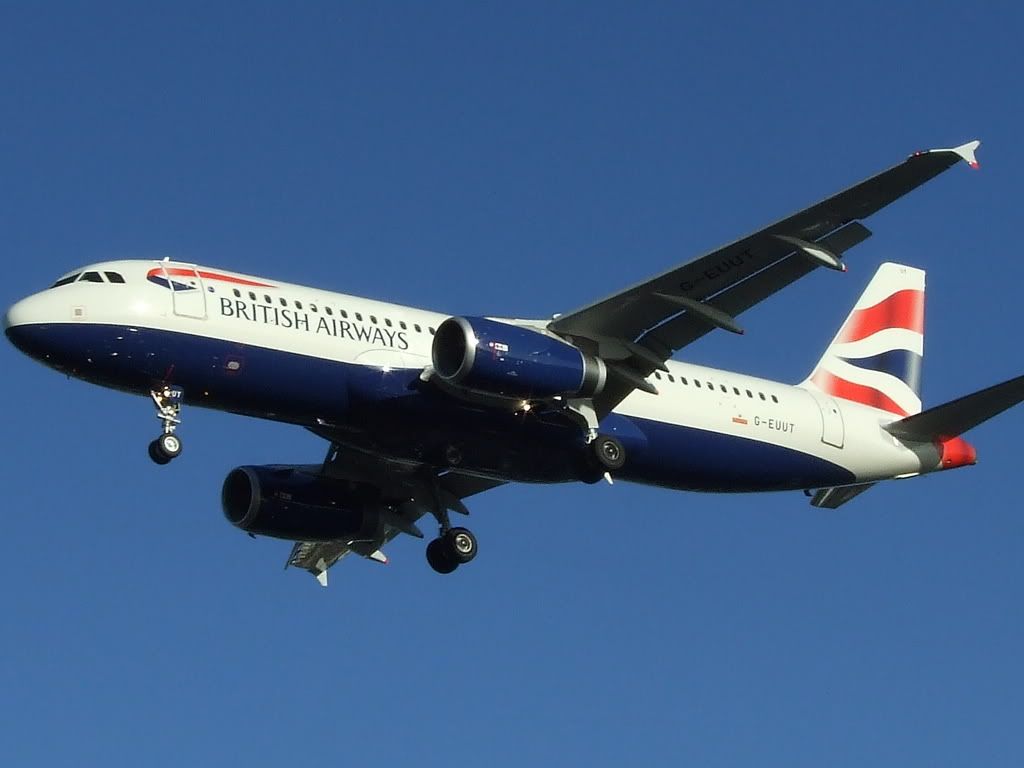
But i wanted a different shot....more action needed...And i didn't even realise i got Windsor Castle under the left wing....!

I moved around the limited space i had to try to get the "shot"

Its something i hadn't thought about before.....I wanted the pictures to be GOOD.... :doho:

I have shot many an airliner before but i was trying to capture....? The power ?

Its very hard to frame the subject just right and miss out on things that shouldn't be in the photo....

I continued moving around the location trying to find the right angle....

Looking for something unusual....
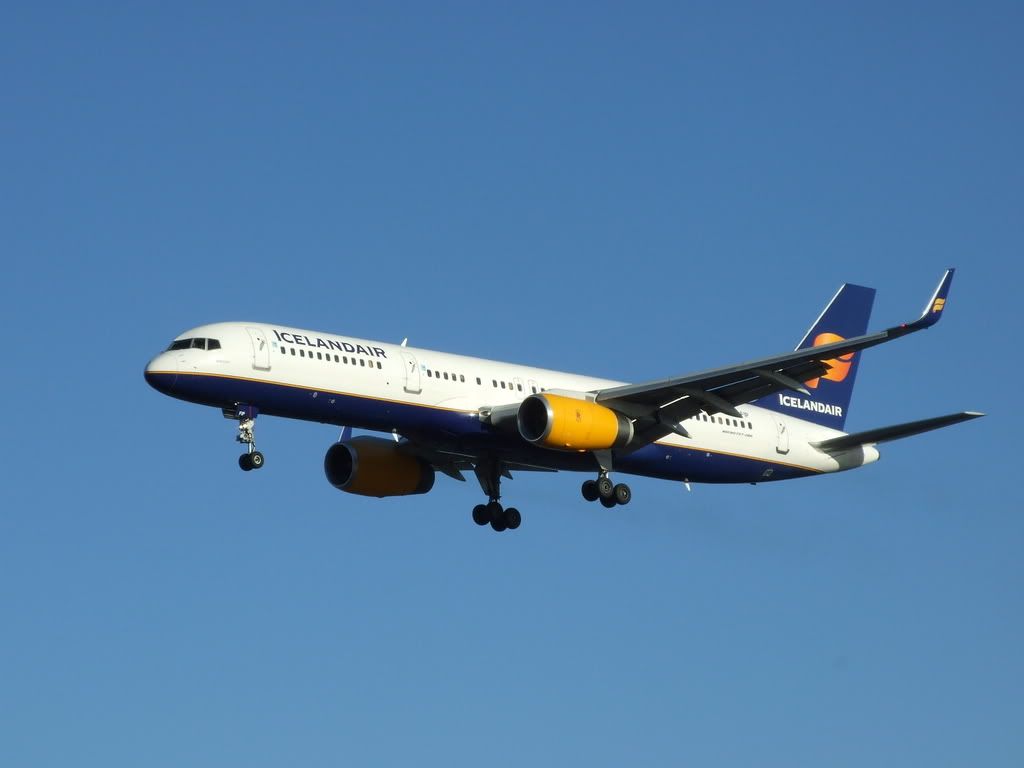
And found it here......Is this a new/old scheme...or an interim..?

Then i moved and made the mistake of having the sun in my face.....


And it just got worse..... Coolio

It was a good morning though (but Bloody freezing...! ) and i learnt a bit more about my camera....so thanks guys.....

Hope you enjoyed these pictures ?
Tony
Re: Warning....Loadsa photos...!
Posted: 29 Dec 2007, 14:03
by ianhind
I like the Air New Zealand 747 shot very much. My photos always tend to be side on shots of the whole plane (sort of archival!)- I must get more interesting ones.
The next Lufthansa one looks a bit blurred.
Are you using the viewfinder or the screen for composing the shots?
And G-MEDL is in interim colour scheme. BMI bought British Mediterranean so what you see is the old BA colours merged with BMI scheme.
And looks like you were at the threshold of 27R - lucky to not get moved on?
Ian
Re: Warning....Loadsa photos...!
Posted: 29 Dec 2007, 14:24
by Techy111
ianhind wrote:
Are you using the viewfinder or the screen for composing the shots?
And looks like you were at the threshold of 27R - lucky to not get moved on?
Ian
I use the viewfinder always and luckily no PC Plod :tab:
Tony
Re: Warning....Loadsa photos...!
Posted: 29 Dec 2007, 16:38
by forthbridge
Excellent Tony, you seem to have cracked exposure

As you have experienced, you need to watch with that nasty white shade of paint as it can ruin a shot with bright reflections!!
I'm sure you will take info from these shots and go back for more...

Re: Warning....Loadsa photos...!
Posted: 29 Dec 2007, 22:13
by Robin
Some of them are really good. The Sun can be your best friend or your worst enemy. If you have light, make the most of it and as a general rule if you can avoid it, never shoot into the sun.
And if the light is as good as it looks, the lower the ISO the better as it will probably create un-necessary noise on the photo.
What kit are you using Tony?
Re: Warning....Loadsa photos...!
Posted: 29 Dec 2007, 23:28
by forthbridge
It's all about 'exposure'. ISO 200 is perfectly acceptable for virtually anything IMO. Remember, ISO is the sensor (or film's) sensitivity to light.
There is an argument that ISO 400 is better in bright light for fast action - and in fact I used this at Fairford this year (on the Saturday). It meant I had to use higher than usual shutter speeds (so got no prop blur) but I knew that beforehand. There are no noise issues with the results.
What this means basically is you have slightly more latitude (higher shutter speed = less chance of motion blur through camera shake particuarly when using zoom).
Also, it is important you have your monitor set up correctly. To some degree, it is unimportant what I or anyone else comment on noise, as unless the poster's monitor is set up correctly they will not see it in the same way (or we will not see what they do!!).
Also, a monitor has a fraction of the resolution of most modern digital cameras. (this is why images look unsharp at max size). A correctly exposed shot with wide dynamic range (Meaning lights and darks) will actually show up with little speckles of 'noise' on a monitor. When printed (Which is the purpose of cameras!) this is negated because the ink 'runs' slightly when printed and absorbed, so little speckles are 'filled'.
Digital noise is different to this and shows up as coloured pixels. It should not be an issue generally, and remember, we can already get shots on digital that were impossible on film in terms of high ISO and smoothness. The trouble is that people *expect* ISO 1600 and above to deliver smooth as silk results. While it is perfectly possible to take shots at these ISO settings and get decent and smooth shots, remember that the *reason* the camera is set like that (usually) is lack of light - which is not ideal photographic conditions!
It also depends on one's equipment of course.
Re: Warning....Loadsa photos...!
Posted: 30 Dec 2007, 00:10
by speedbird591
forthbridge wrote: remember that the *reason* the camera is set like that (usually) is lack of light - which is not ideal photographic conditions!
I totally agree with Jim here. Photography is all about light and the less of it there is, the less impact the photo will have (as a generalisation). Everybody will have their own idea of what they want to create and personally, I choose not to bother with a photo if there is so little light that it needs an ISO higher than 200. That's not to say it's wrong - it's my own choice.
But, Tony. What marvellous shots
There are some crackers there. Some difficult subjects, too. The vast expanse of bright white on some of those aircraft, contrasting with the dark blue is just about impossible to expose correctly but it looks pretty good to me. Just out of interest, I don't know if you know about white balance? You may have seen the option of using pre-sets on your camera such as daylight, cloudy, tungsten etc. It is so that the camera can shift the colour balance so that white looks white under different conditions. Yours was obviously set to daylight as it came out looking, well, white

It's worth remembering to change this setting in cloudy weather or under electric lights or the whites will have a coloured tint.
You mentioned the difficulty of framing the shots, but rather than trying to get it perfect you
could shoot at the maximum size and quality, zoom out a bit and leave room for cropping a nice composition on the PC later on. You're not likely to want to print it out A3 size - or are you? Also, there's no particular reason to keep a photo a set shape and size (800x600 or 7x5 etc). You can crop it to whatever size and shape makes the best impact and cuts out distracting background stuff. You can also crop in tight to just part of the aircraft. In fact you can do whatever you like! Taking the photo is just the start with digital!
Really great shots, thanks for letting us see them. I've told the girls and they said to tell you that as soon as you feel confident, they'll come round to your place.
Ian
Re: Warning....Loadsa photos...!
Posted: 30 Dec 2007, 00:46
by ianhind
In my days of film SLR, I regularly used ISO400 Kodakchrome simply because the large f number telephoto lenses (f/8) that I could afford needed that extra bit of flexibility. Give the choice, I was pleased with that decision. I would have missed a lot of unrepeatable wildlife and aviation shots if I had stuck with slower film.
For the digital SLR, where the choice of ISO is at the user's decision rather than the film, I do tend to stick with ISO200, but will increase if the conditions require - better to try and fail.
As for exposure conditions, Tony should try similar shots against high grey overcast. I find the lack of contrast can be challenging.
And I note that the Fuji 5600 can save RAW files - if used, it may be possible to change the white balance after the event.
And as Ian says, don't forget about cropping to get the final picture. My two moon photos are actually from the same photo - one is the overall perspective, the other is the same one cropped (1:1) for a more dramatic effect.
Re: Warning....Loadsa photos...!
Posted: 30 Dec 2007, 10:22
by Techy111
I took your guys advice on the sunny day and set my camera to manual (S6500fd fuji 6megapixel) ISO was set at 200 and shutter speed was 500....I set the camera mode to sunny day and away i went....
Its cloudy today but the aircraft are landing at the wrong runway to be able to get good shots...(busy road) no places to stand... :-(
I think the settings for some where still on automatic as the aperture was changing as i panned by itself ranging from f2.8 the lowest it would go to f11 which i could use the = or - to adjust but i think there is an option somewhere in the manual to show how to set this option to manual also....? when i got home i found in the manual in had 2 settings one for tele and one for wide....!
And Ian.....will they be wearing their uniforms....?

Tony
Re: Warning....Loadsa photos...!
Posted: 30 Dec 2007, 10:55
by forthbridge
HI all,
Tony, do bear in mind as others say - there is so much flexibility with digital! As Ian mentions, it can be tricky against grey skies, although you should find workarounds in composition for this. At the moment, the light (when It's out) is nice for photography with the sun being low on the horizon - late spring and summer bring other challenges to the current 'classy light'!
The real enemy of photography is lack of contrast - or too much contrast!
Think of a 'correctly' exposed sea harrier in the dark grey livery on a miserable and dull day. It would look flat. However, had it been peeing down, and the 'plane had some wet on it and some puddles around, this could give enough contrast to give the image some 'bite' even if it was as dark.
On the other hand, too much contrast (such as a BA 'plane on a full sun day) can be tricky to get right as well and may need toned down!
Sounds like your cam was on some sort of Av manual mode Tony (shutter speed fixed and the camera decides aperture - which will change depending on your zoom level) - if you can figure out 'full' manual, for similar conditions to yesterday, I'd suggest an f-stop around f7.1-8. Left there you will get reasonable depth of field, and it is simply a case of dialling the speed up or down to get the exposure. If you find it going below 1/500, then simply reduce the f number (increasing aperture) and this enables a higher shutter speed.
